

Maximize Your Insights with SimilarWeb Extension
The SimilarWeb extension is a free tool that allows users to gain insights into the traffic and key metrics of any website directly from their browser. By leveraging this extension, businesses can make informed decisions based on real-time data. Whether you’re a digital marketer, SEO specialist, or business owner, understanding your competitors’ online presence is essential.
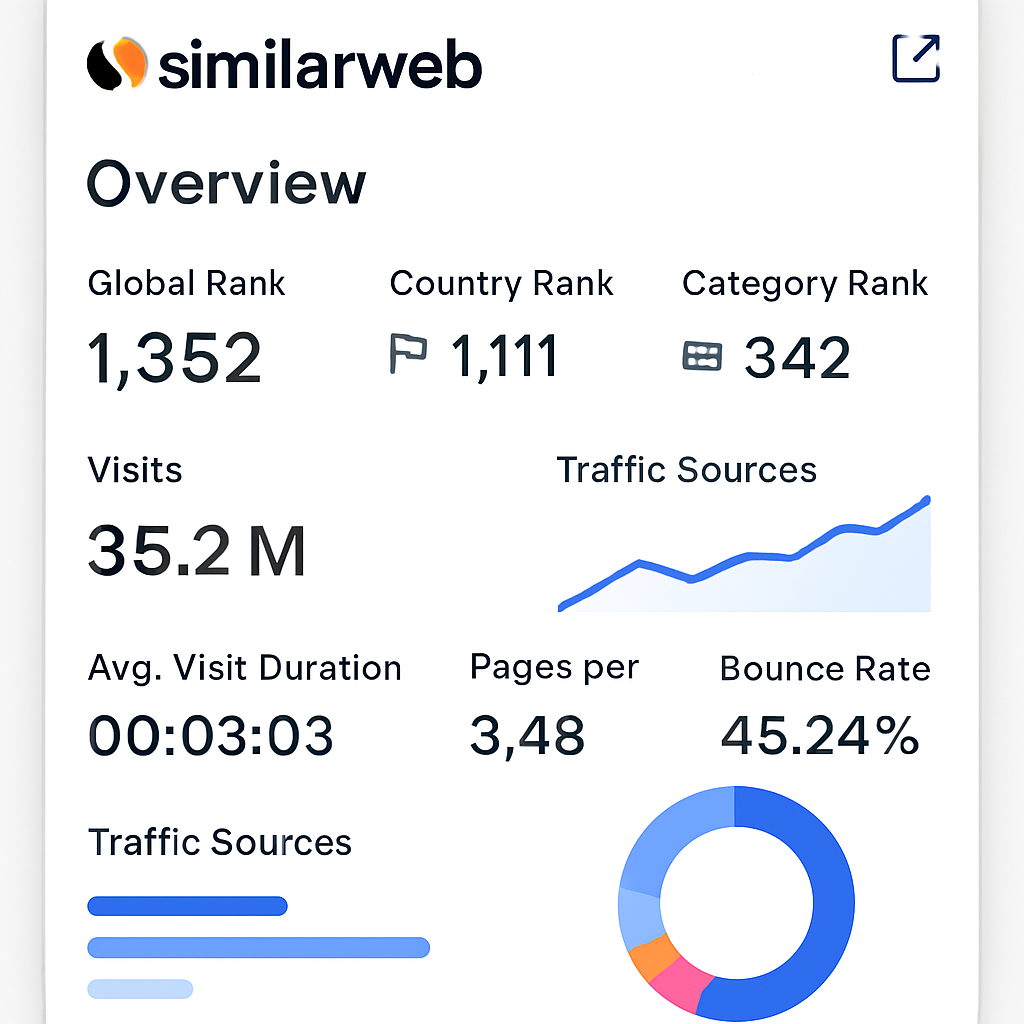
Key Features of the SimilarWeb Extension
- Traffic Overview: Get a snapshot of a website’s traffic, including visit numbers, traffic sources, and engagement metrics like bounce rate and average visit duration. These metrics allow businesses to assess a site’s performance and identify trends over time. By understanding traffic patterns, companies can optimize their content strategy to attract more visitors. Traffic overview data is crucial for benchmarking against competitors and setting realistic growth targets.
- Traffic Sources: Understand where a site’s traffic comes from, whether it’s direct, organic search, paid search, social, or referrals. By analyzing traffic sources, businesses can allocate their marketing budget more effectively. Knowing which channels drive the most traffic helps in refining marketing strategies and maximizing ROI. This information is also vital for identifying potential partnerships and cross-promotion opportunities.
- Audience Insights: Discover the audience demographics, interests, and geolocation. Understanding your audience’s profile enables personalized marketing and better customer engagement. Audience insights can inform product development and content creation to meet customer needs. Geolocation data helps in tailoring marketing campaigns to specific regions for better resonance and impact.
- Competitor Analysis: Compare a website’s performance against competitors in the same industry or niche. Competitor analysis reveals market trends and opportunities for differentiation. By identifying competitors’ strengths and weaknesses, businesses can refine their unique value proposition. Regular competitor analysis ensures that businesses remain agile and responsive to market changes.
- Keyword Analysis: Uncover which keywords are driving traffic to a site, and gauge the effectiveness of SEO strategies. Keyword analysis helps in identifying high-performing keywords and content gaps. This feature aids in optimizing content for search engines to improve visibility and attract targeted traffic. Keeping track of keyword trends ensures that SEO strategies remain relevant and competitive.
How to Install and Use the SimilarWeb Extension
To get started with the SimilarWeb extension, follow these simple steps:
- Download: Visit the Chrome Web Store and search for the SimilarWeb extension. Click “Add to Chrome” to install it. Ensure you’re logged into your Google account to facilitate a seamless installation. The process is quick and doesn’t require any technical expertise. Once added, the extension automatically integrates with your browser.
- Activate: Once installed, click on the SimilarWeb icon in your browser’s toolbar to activate the extension. A pop-up will guide you through the initial setup process. You may need to grant permissions for the extension to access site data. Activation ensures that the extension is ready to analyze any website you visit.
- Explore: Enter any website URL, and the extension will display the site’s analytics in a user-friendly dashboard. Familiarize yourself with the dashboard layout to quickly access key metrics. Use the insights to enhance your marketing strategies and online presence. Regularly explore different websites to broaden your competitive knowledge.
Benefits of Using SimilarWeb Extension
The SimilarWeb extension provides several advantages for businesses and marketers:
- Ease of Use: With its intuitive design, accessing detailed analytics is straightforward, even for those new to web analytics. The user-friendly interface simplifies data interpretation, making it accessible to all team members. This ease of use reduces the learning curve and encourages frequent utilization of the tool. Streamlined access to insights fosters data-driven decision-making across the organization.
- Real-Time Data: Make informed decisions based on the most current data available. Real-time analytics ensure that businesses can respond swiftly to market changes. Up-to-date data supports agile marketing strategies and timely adjustments to campaigns. Leveraging current insights helps in maintaining a competitive edge and capitalizing on emerging trends.
- Competitive Edge: By understanding your competitors’ strengths and weaknesses, you can tailor your strategies to outperform them. Competitive insights drive innovation and strategic planning. Armed with comprehensive data, businesses can preemptively counter competitive threats. Continuous analysis of competitors fosters a proactive approach to market positioning.
SimilarWeb Pro: Advanced Features and Pricing
For those seeking even more comprehensive insights, SimilarWeb offers a Pro version. SimilarWeb Pro provides advanced features like detailed keyword analysis, more granular audience insights, and the ability to track multiple websites. The cost of SimilarWeb Pro varies depending on the package and features selected, so it’s best to contact SimilarWeb directly for a quote tailored to your needs.
Exploring Pro Features
- Detailed Keyword Analysis: Gain deeper insights into keyword performance and trends. The Pro version allows for more extensive keyword research, aiding in fine-tuning SEO strategies. Detailed analysis supports strategic content planning and competitive benchmarking. Continuous keyword monitoring helps maintain search engine ranking and visibility.
- Granular Audience Insights: Access more specific data on audience segments and behaviors. Granular insights enable hyper-targeted marketing campaigns and improved customer engagement. Understanding niche audience behaviors supports personalized content and product offerings. These insights are crucial for optimizing user experience and increasing customer loyalty.
- Multi-site Tracking: Monitor multiple websites from a single dashboard for comprehensive analysis. Multi-site tracking facilitates cross-comparison and portfolio management. This feature is particularly beneficial for agencies managing multiple client sites. Efficient tracking of multiple sites enables streamlined reporting and strategic oversight.
Comparing SimilarWeb with Competitors
When it comes to web analytics, SimilarWeb isn’t the only option. Two popular competitors are SEMrush and Ahrefs. Let’s see how they compare:
- SEMrush vs. SimilarWeb: SEMrush offers a robust suite of SEO tools, including keyword research, site audits, and backlink analysis. While both platforms provide valuable insights, SEMrush is often favored for in-depth SEO analytics, whereas SimilarWeb excels in traffic and competitive analysis. SEMrush’s comprehensive SEO features make it a go-to for detailed optimization tasks. However, SimilarWeb’s strength lies in its ability to provide a holistic view of web traffic and market dynamics.
- Ahrefs vs. SimilarWeb: Ahrefs is renowned for its backlink analysis and keyword research capabilities. SimilarWeb, on the other hand, offers a broader view of web traffic and engagement metrics. The choice between the two depends on whether your focus is more on SEO or overall web analytics. Ahrefs’ detailed link building insights are invaluable for SEO professionals, whereas SimilarWeb’s extensive traffic analysis benefits marketers seeking a wider lens on digital presence.
- Choosing the Right Tool: Consider your specific needs when selecting a web analytics tool. If your focus is on detailed SEO and link building, Ahrefs or SEMrush may be more suitable. For broad traffic insights and competitive analysis, SimilarWeb offers unparalleled advantages. Align your choice with your business goals and the insights you prioritize.
SimilarWeb Alternatives: Exploring Other Options
While SimilarWeb is a powerful tool, there are other alternatives worth considering:
- Alexa: Known for providing website traffic metrics and global rankings, Alexa is a solid alternative for those focusing on traffic analysis. Alexa’s insights are beneficial for understanding site popularity and benchmarking against competitors. Its global ranking feature provides a broader perspective on market position. The platform’s simplicity makes it accessible to users at all levels of analytics expertise.
- Quantcast: Specializing in audience insights and programmatic advertising, Quantcast offers unique features for targeting and understanding audiences. Quantcast’s focus on audience behavior aids in creating personalized marketing strategies. Its programmatic advertising capabilities enhance targeted campaign delivery. The platform’s strong audience insights make it a valuable tool for advertisers and marketers alike.
- StatCounter: This tool provides real-time visitor stats and insights, making it a simple yet effective option for basic web analytics. StatCounter’s real-time data supports immediate response to visitor behavior. Its straightforward interface is ideal for small businesses and beginners in web analytics. Despite its simplicity, StatCounter offers essential metrics for understanding site performance.
How to Choose the Right Tool
Selecting the right web analytics tool depends on your specific needs and goals. Consider what metrics are most important for your business and how you plan to use the data. If your priority is understanding overall web traffic and competitor analysis, SimilarWeb is an excellent choice. However, if you’re more focused on SEO metrics, SEMrush or Ahrefs might be more suitable.
- Assessing Business Needs: Define your primary objectives for using web analytics. Identify whether your focus is on traffic insights, SEO, or audience understanding. Match your tool choice with your business goals for optimal results. A clear understanding of your needs ensures efficient utilization of the chosen analytics platform.
- Evaluating Features and Pricing: Compare the features and pricing of different analytics tools. Consider the value each tool brings relative to its cost. Ensure that the tool’s features align with your specific requirements. A thorough evaluation helps in making a cost-effective decision that maximizes return on investment.
- Testing and Feedback: Trial different tools to gauge their effectiveness and ease of use. Gather feedback from team members to understand their experiences with the tool. Testing helps in identifying any limitations or areas for improvement. Continuous feedback ensures that the chosen tool meets evolving business needs.
Using SimilarWeb API for Custom Integrations
For businesses looking to integrate web analytics data into their existing systems, the SimilarWeb API is a valuable resource. The API allows for custom data extractions and integrations, enabling you to tailor insights to your business requirements.

Getting Started with SimilarWeb API
To utilize the SimilarWeb API, you’ll need to:
- Sign Up: Create an account on the SimilarWeb website and gain access to the API documentation. The sign-up process is straightforward and provides immediate access to valuable resources. Familiarize yourself with the API capabilities and potential applications. Access to documentation ensures that you can leverage the API effectively.
- Authenticate: Use your API key to authenticate requests and start extracting data. Secure authentication protects your data and maintains privacy. Ensure that you follow best practices for API security to prevent unauthorized access. A robust authentication process is key to maintaining data integrity.
- Integrate: Work with developers to integrate the data into your business systems or dashboards. Collaboration with technical teams ensures smooth integration and functionality. Tailor the data extraction process to align with your business needs. Efficient integration enhances decision-making and operational efficiency.
Conclusion
The SimilarWeb extension is a powerful tool that offers a wealth of information at your fingertips. Whether you’re analyzing competitors or optimizing your own site’s performance, the insights provided by SimilarWeb can help drive strategic decisions. By understanding the cost, features, and competitors of SimilarWeb, you can make an informed decision about whether it’s the right tool for your business.
In a rapidly evolving digital landscape, staying informed and adaptable is key. Leverage the power of the SimilarWeb extension to maximize your insights and maintain a competitive edge. Regularly update your knowledge and strategies based on the latest data to ensure continued success. The right analytics tools can transform your approach to digital marketing and business growth.