
Table of Contents
Top Descript Alternatives: Discover the Best Tools for Your Audio and Video Editing Needs
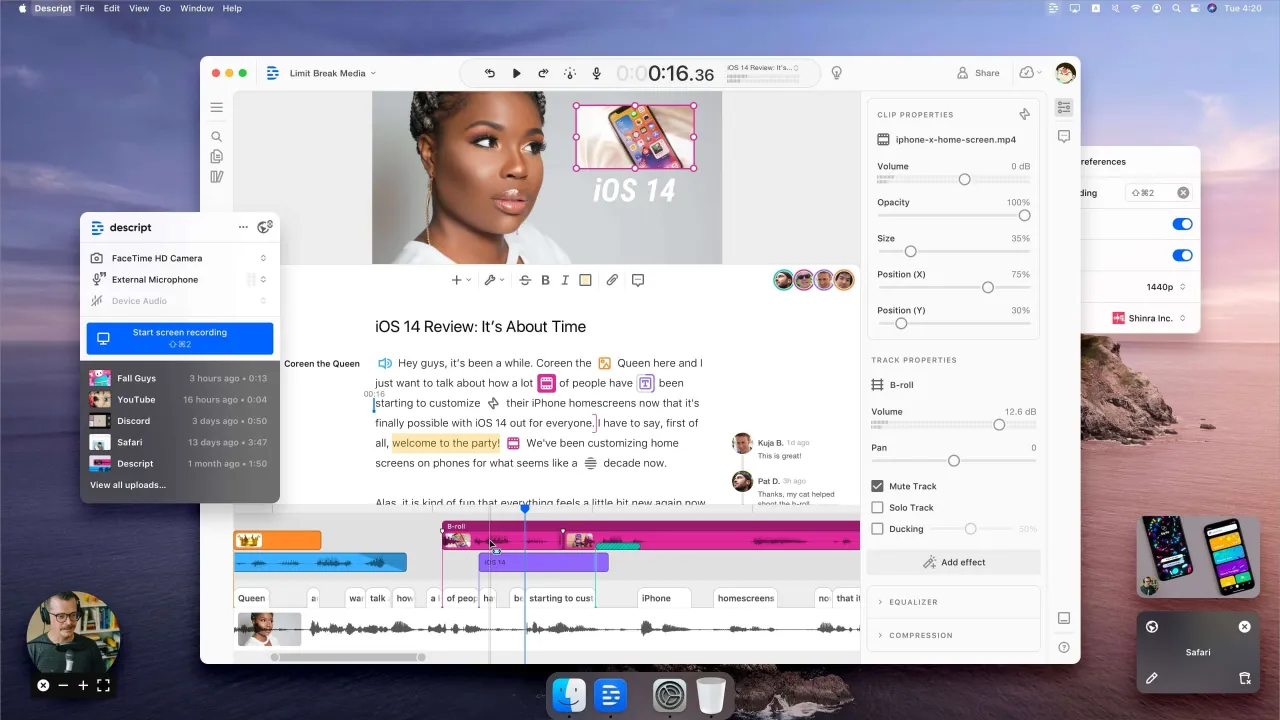
As entrepreneurs and creators dive deeper into the digital landscape, the need for efficient audio and video editing tools has never been more critical. However, choosing the right software can sometimes feel overwhelming due to the myriad of options available. This article will explore the Descript Alternatives and help you find the perfect fit for your editing requirements.
Why Look for Alternatives to Descript?
The demand for dynamic audio and video editing tools has scaled tremendously, leading many users to explore various options beyond Descript. Here are some common limitations users may encounter:
- Pricing: Descript’s pricing model can be prohibitive for casual users or small businesses, especially when compared to other software solutions that offer more affordable plans.
- Missing Features: While Descript excels in transcription and collaborative editing, it may lack advanced audio manipulation features that professionals require.
- Integrations: Some users find that Descript doesn’t integrate well with additional tools they are already using, which can hinder workflow efficiency.
Best Alternatives to Descript
1. Adobe Premiere Pro
Adobe Premiere Pro is a professional-grade video editing software that’s widely used in the industry. It offers extensive editing features suitable for both beginners and experienced editors.
- Key Features: Multi-camera editing, advanced color grading, and motion graphics templates.
- Pros: Rich in features and integrates seamlessly with other Adobe products.
- Cons: Steeper learning curve and a subscription-based pricing model.
- Pricing: Starts at $20.99/month.
2. Final Cut Pro
Final Cut Pro is an Apple product favored by Mac users. Its intuitive interface and powerful performance make it a worthy alternative.
- Key Features: Magnetic timeline, advanced HDR support, and seamless integration with other Apple software.
- Pros: Extremely fast rendering and efficient media management.
- Cons: Only available for macOS and higher upfront cost.
- Pricing: One-time payment of $299.99.
3. Camtasia
Camtasia is ideal for both video editing and screen recording, making it a favorite among educators and marketers.
- Key Features: Built-in screen recorder, quizzes and interactivity features.
- Pros: User-friendly and great for creating educational content.
- Cons: Limited export formats and can become resource-heavy.
- Pricing: One-time fee of $249.99.
4. Audacity
For those focusing on audio editing, Audacity is a free, open-source software that provides a wide array of features suitable for podcast production and music editing.
- Key Features: Multi-track editing, effects, and support for various audio formats.
- Pros: Free of cost and widely supported by the community.
- Cons: Limited toward video editing and has a somewhat outdated interface.
- Pricing: Free.
5. Filmora
Filmora is known for its easy-to-use interface that attracts budding content creators. It offers simple drag-and-drop features that make editing a breeze.
- Key Features: Overlays, filters, and a library of licensed music.
- Pros: Affordable pricing and an intuitive user interface.
- Cons: Fewer advanced features for professional editing.
- Pricing: Starts at $39.99/year.
6. Wave.video
Wave.video provides users with an excellent mix of video editing and marketing tools, making it suitable for social media managers.
- Key Features: Video hosting, template gallery, and integration with stock asset libraries.
- Pros: All-in-one video solution with social media optimization.
- Cons: Limited features in the free plan.
- Pricing: Free plan available; paid plans start at $39/month.
7. InVideo
InVideo is an online video editor preferred for creating promotional videos, ads, and social media content with its template-based approach.
- Key Features: Access to 5000+ templates, stock media library, and text overlays.
- Pros: User-friendly with extensive customization options.
- Cons: Exporting videos may have a watermark in the free plan.
- Pricing: Free plan available; plans start at $15/month.
Frequently Asked Questions
- What features should I look for in a video editing tool?
- You should consider features like timeline editing, effects, audio control, and compatibility with various file formats based on your specific needs.
Can I use free alternatives effectively?Yes, many free alternatives like Audacity offer essential features for basic editing tasks, suitable for personal or small-scale projects.
Are online video editors reliable?Online video editors are increasingly reliable and offer great features, but they may have limitations such as slower processing speeds depending on your internet connection.
What should I consider before switching from Descript?Evaluate your current editing needs, pricing, and whether the alternatives have the features you require for efficient workflows.
Is it worth paying for premium video editing software?If you need advanced features or have professional editing needs, paying for premium software usually offers better value and performance.
Best Use Cases and Practical Tips

Whether you’re an entrepreneur, creator, or developer, here are some practical tips for leveraging video editing tools effectively:
- Assess Your Needs: Identify your primary use cases, such as social media content, long-form tutorials, or high-production videos, to choose a suitable tool.
- Explore Templates: Utilize template features for faster project initiation, especially for recurring content like webinars or promotional videos.
- Engage Audiences: Use engaging overlays and effects to attract and retain viewers, thus enhancing your content marketing efforts.
- Integrate Audio Editing: Combine audio and video editing for cohesive content, particularly important for podcasts or educational materials.
- Stay Updated: Regularly check for software updates, as many editing tools continuously improve their features based on user feedback.
Conclusion
Finding the right video or audio editing tool can significantly impact your productivity and content quality. While Descript provides robust features, exploring various Descript Alternatives might uncover options that better match your specific needs. Whether you’re looking for affordability, unique features, or seamless integrations, the right tool is out there waiting for you.